For environmental monitoring programs
Environmental data management software.
Load, validate, and standardize lab and field data on a defensible, tamper-evident record — your as-reported values are never overwritten, and every import prints an audit report of what it did.
We run your own deliverable and send the audit report back. Nothing moves until you say so.
As reported → canonical
Illustrative — sample data
| Analyte | As reported | Canonical | Factor | Status |
|---|---|---|---|---|
| Trichloroethylene 79-01-6 | 0.0047 mg/L | 4.7 ug/L | ×1000.0 | Converted |
| Tetrachloroethene 127-18-4 | <0.5 UG/L Non-detect | <0.5 ug/L | ×1.0 | Unit normalized |
| Benzene 71-43-2 | 12 ug/L Estimated | 12 ug/L | ×1.0 | Already canonical |
Conversion registry 2026-07-20.1 · as-reported values are stored unmodified · canonical values are derived, not written over the original
CHEMDAS by the numbers
- deliverable formats read end to end, each with its own parser
- 3
- tables and sheets routed by declared content signature, not by filename
- 30
- EPA-aligned sample classifications, including field and lab QC
- 24
- measurement dimensions in the canonical unit registry
- 14
Every figure above is read from the running system when this page renders · canonical unit registry 2026-07-20.1
See what each one doesData defensibility
The record you'll have to defend is preserved, not rewritten.
As-reported values stay exactly as the lab sent them. Canonical values, qualifiers, and provenance are derived alongside — never over — the original, on a chain-of-custody-grade record.
Every term on this page is defined against the code that implements it.
Read the glossaryCanonical Units & Provenance
A canonical unit is derived beside the lab's own value, never over it, with the conversion factor, registry version, and status recorded on every result.
Learn moreResult Qualifiers
J, R, U, B, E, D and compounds resolved from a versioned dictionary; rejected data can never quietly re-enter a trend or a screening pass.
Learn moreAnalyte Resolution
Lab shorthand like "TCE" resolves to Trichloroethylene against a CAS-keyed dictionary; parameters with no CAS still resolve and commit instead of being dropped.
Learn moreAudit Trail
An append-only, SHA-256 hash-chained log of every validation failure, correction, and edit; committed records carry a tamper-evident hash.
Learn moreProof, every run
Nothing commits until it's checked — and every run proves what it did.
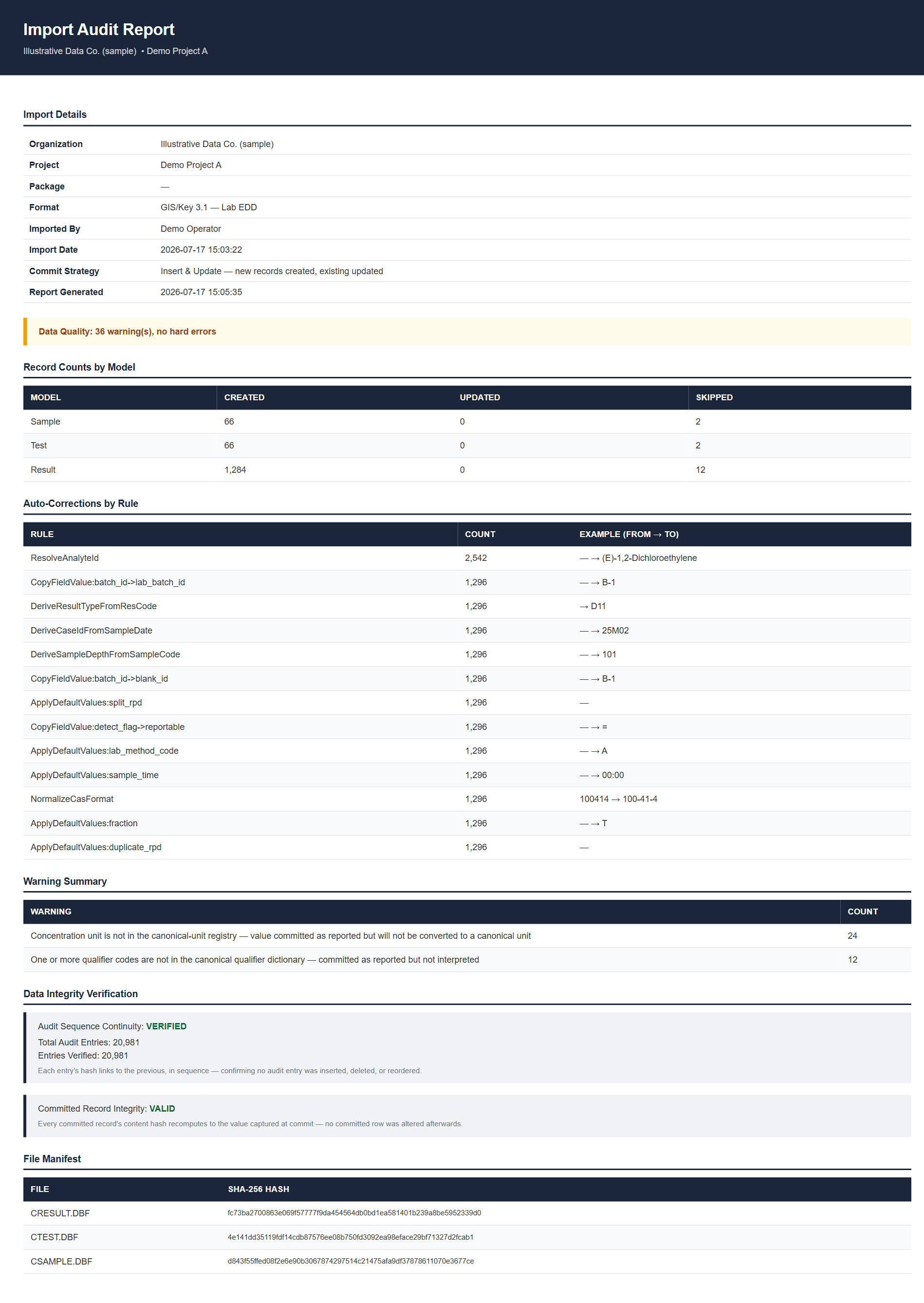
On a lab deliverable, severity-tiered rules hold the commit until every row passes. When a run finishes, it prints an Import Audit Report you can hand a reviewer.
Import Audit Report
Illustrative — sample data
Validation Rules
Required fields, CAS format, dates, unit-aware ranges, and method are checked at the Validate step; an error holds the commit until it's fixed or skipped.
Learn moreRollback & Archive
Every pre-commit step is staged and reversible. Rollback deletes committed rows and marks staged rows rolled back, verified by an independent pass written into the same report.
Learn moreQA/QC Workflow
Viewing, exporting, and editing QA/QC data are separate permission verbs, gated by the organization's own entitlement — not bundled into one fixed role.
Learn moreRegulatory criteria screening
Compare every result against the standard that governs it.
A live engine screens your results against the regulatory criteria sets you choose and a land-use scenario — flagging each result above or below its screening level.
-
Screened, not typed
MCLs, RSLs, and state screening levels are compared by the engine — not by hand in a spreadsheet.
-
Every exceedance flagged
Results with no applicable standard are counted separately rather than quietly passing.
-
Frozen for the record
Freeze a whole-project pass as a write-once official determination for reporting.
Built AI-native
Ask your data a question — in plain language.
Natural-language querying is built into the platform, not bolted on. Trends, exports, and a headless API sit on the same committed record — no spreadsheet round-trip.
AI Assistant
Query and analyze the lab data already committed to your project in natural language, on the Laravel AI SDK — no separate export required.
Learn moreTrends
Time-series concentration trends that render non-detects and detection limits alongside detected values, with zoom, pan, and project-scoped filters.
Learn moreExports
Data comes back out as a tabbed .xlsx workbook, a CSV archive, or a GIS\Key 3.1 DBF export, with audit history on generated files.
Learn moreHeadless API
Drive the same pipeline the admin panel uses — stage, validate, standardize, commit, rollback — over a Sanctum-authenticated /api/v1/import.
Learn moreThe economics
Most of what you're quoted isn't software.
In the proposals we've seen, roughly two-thirds of the annual price isn't the licence — it's a vendor's desk hand-keying your data, every quarter, forever.
If you're a consultant
CHEMDAS automates the keying, not the judgment. Those are the lowest-rate hours on the invoice — you still bill the quarter.
Coming off GIS\Key
We read all 22 tables — not just the results file.
QC class is encoded by which file a row sits in. Read
CResult.dbf alone and the blanks,
spikes and duplicates that make your results defensible quietly vanish.
Bring us a deliverable. We'll run it and send back the audit report.
Send a GIS\Key 3.1 export, a GIS\Key 3.1 EDD, or a native spreadsheet. We'll run it on your data and send the audit report back — before you move anything.
-
You send a deliverable
A GIS\Key 3.1 export, a GIS\Key 3.1 EDD, or a native spreadsheet. Client identifiers can be stripped first.
-
We run the real pipeline
The same validate, standardize and commit path a customer runs — no bespoke handling.
-
You get the report back
The Import Audit Report for your own data, and the answer to whether it commits clean.